.png?width=350&height=83&name=EN_MemberMarketing%20(3).png)
Begin by navigating to Contacts using the side panel on the left-hand side of your HubSpot dashboard.

Use the search bar to find the specific contact you want to edit.
Now you can edit the contact information in 1 of 2 ways:
- Edit the contact directly on the page.
- Click into the specific field you would like to update and make the change. HubSpot will automatically save this once you click somewhere else on the page.
- Click into the specific field you would like to update and make the change. HubSpot will automatically save this once you click somewhere else on the page.

-
- Click on the contacts name.

- On the left hand side click the text in the field you would like to edit and make your updates. HubSpot will automatically save this once you click somewhere else on the page.
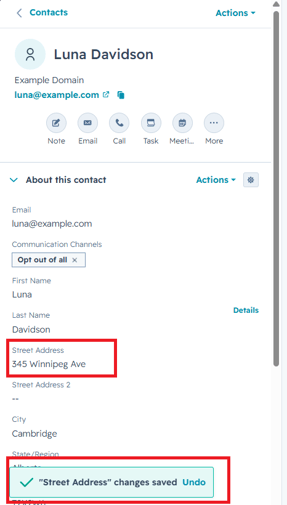
- Click on the contacts name.
Your contact's information is now updated in HubSpot